 Affiliate Program





 FIFA Coins FAQ
How To Get FIFA Backup Code
2018-04-26 18:48:55
When You Choose Confort Trade ,We Need Some Backup Codes To Log In Your Account ,
Follow Thoes Steps To Get Backup Codes;
.jpg)
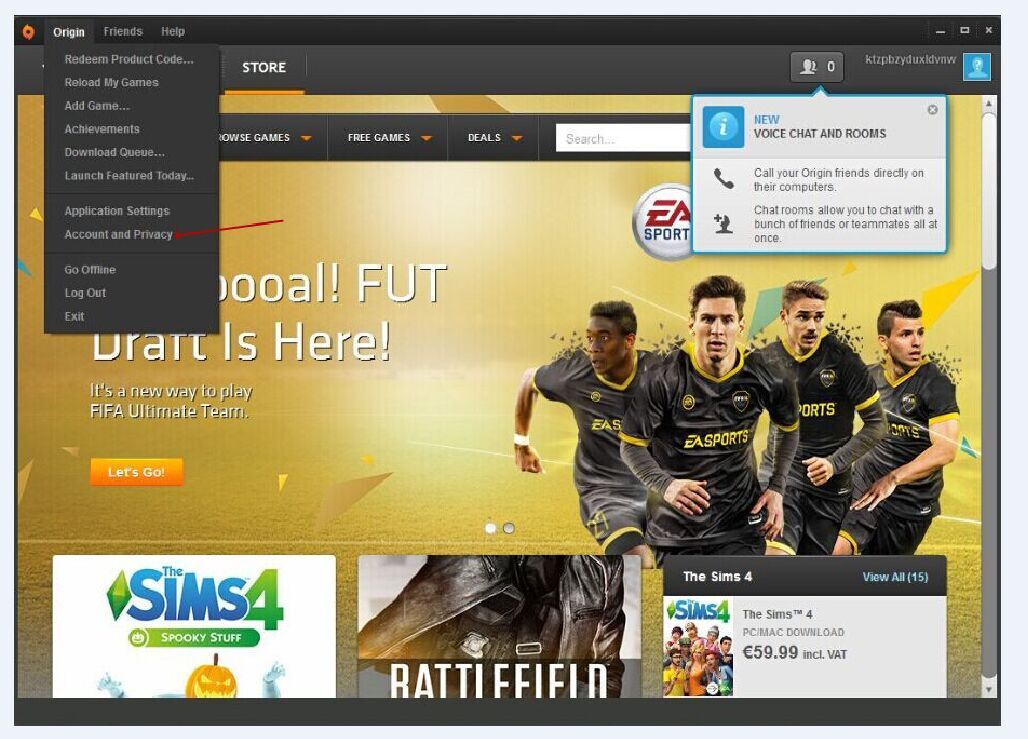
2) Click: My Account-->Privacy Settings-->Security-->View Backup Code
.jpg)
.jpg)
.jpg)
4. Copy The Backup Codes 1,2 And 3 Into The Fields While Placing Your Order. If You Have Already Used One Of Them, You Can Also Create New Codes With The Corresponding Button.
.jpg)
Follow Thoes Steps To Get Backup Codes;
1. Get FIFA Backup Code, Please Go To: https://myaccount.ea.com/cp-ui/security/index
1) Go To Https://Www.Origin.Com Then Log In With Your Origin Account
2) Click: My Account-->Privacy Settings-->Security-->View Backup Code
2. Click On The Point "Security"
3. Click On "View" Backup Codes
4. Copy The Backup Codes 1,2 And 3 Into The Fields While Placing Your Order. If You Have Already Used One Of Them, You Can Also Create New Codes With The Corresponding Button.
To FIFA Coins FAQ you can find from Oggah.com
 Quick Order


 Cheapest Price
 Fastest Delivery
 Safe Payment
 After-Sale Service


